<!DOCTYPE html>
	<html lang="vi" xmlns="http://www.w3.org/1999/xhtml" prefix="og: http://ogp.me/ns#">
	<head>
<title>LAPTOP127 - Top 4 Phần mềm Cắt nhạc MP3 Chuyên nghiệp, Miễn phí 2020</title>
<meta name="description" content="LAPTOP127 - Top 4 Phần mềm Cắt nhạc MP3 Chuyên nghiệp, Miễn phí 2020 - Savefile - Tin tức -...">
<meta name="keywords" content="apple thai nguyen,  ishop thai nguyen,  iphone thai nguyen,  macbook thai nguyen,  ipad thai nguyen,  laptop cu thai nguyen">
<meta name="news_keywords" content="apple thai nguyen,  ishop thai nguyen,  iphone thai nguyen,  macbook thai nguyen,  ipad thai nguyen,  laptop cu thai nguyen">
<meta name="author" content="Laptop Cũ Thái Nguyên - Laptop127">
<meta name="copyright" content="Laptop Cũ Thái Nguyên - Laptop127 [webmaster@laptop127.vn]">
<meta name="robots" content="index, archive, follow, noodp">
<meta name="googlebot" content="index,archive,follow,noodp">
<meta name="msnbot" content="all,index,follow">
<meta name="generator" content="NukeViet v4.4">
<meta http-equiv="Content-Type" content="text/html; charset=utf-8">
<meta property="og:title" content="LAPTOP127 - Top 4 Phần mềm Cắt nhạc MP3 Chuyên nghiệp, Miễn phí 2020">
<meta property="og:type" content="website">
<meta property="og:description" content="Savefile - Tin tức - http&#x3A;&#x002F;&#x002F;www.laptop127.vn&#x002F;news&#x002F;savefile&#x002F;tin-tuc&#x002F;laptop127-top-4-phan-mem-cat-nhac-mp3-chuyen-nghiep-mien-phi-2020-95.html">
<meta property="og:site_name" content="Laptop Cũ Thái Nguyên - Laptop127">
<meta property="og:url" content="http://laptop127.vn/news/tin-tuc/laptop127-top-4-phan-mem-cat-nhac-mp3-chuyen-nghiep-mien-phi-2020-95.html">
<link rel="shortcut icon" href="http://www.laptop127.vn/uploads/about/logo.png">
<link rel="canonical" href="http://laptop127.vn/news/tin-tuc/laptop127-top-4-phan-mem-cat-nhac-mp3-chuyen-nghiep-mien-phi-2020-95.html">
<link rel="alternate" href="http://www.laptop127.vn/news/rss/" title="Tin tức" type="application/rss+xml">
<link rel="alternate" href="http://www.laptop127.vn/news/rss/tin-tuc/" title="Tin tức - Tin tức" type="application/rss+xml">
<link rel="alternate" href="http://www.laptop127.vn/news/rss/kinh-nghiem-thu-thuat/" title="Tin tức - TRẢ GÓP TẠI LAPTOP127" type="application/rss+xml">
<link rel="alternate" href="http://www.laptop127.vn/news/rss/khuyen-mai/" title="Tin tức - Khuyến mãi" type="application/rss+xml">
<link rel="alternate" href="http://www.laptop127.vn/news/rss/danh-gia/" title="Tin tức - Đánh giá" type="application/rss+xml">
<link rel="alternate" href="http://www.laptop127.vn/news/rss/thu-thuat/" title="Tin tức - THỦ THUẬT" type="application/rss+xml">
<link rel="preload" as="script" href="http://www.laptop127.vn/assets/js/jquery/jquery.min.js">
<link rel="preload" as="script" href="http://www.laptop127.vn/assets/js/language/vi.js">
<link rel="preload" as="script" href="http://www.laptop127.vn/assets/js/global.js">
<link rel="preload" as="script" href="http://www.laptop127.vn/themes/laptop127/js/news.js">
<link rel="preload" as="script" href="http://www.laptop127.vn/themes/laptop127/js/main.js">
<link rel="preload" as="script" href="http://www.laptop127.vn/themes/laptop127/js/bootstrap.min.js">
<link rel="StyleSheet" type="text/css" href="http://laptop127.vn/fonts/css/font.css" />
<link rel="StyleSheet" href="http://www.laptop127.vn/assets/css/font-awesome.min.css">
<link rel="StyleSheet" href="http://www.laptop127.vn/themes/laptop127/css/bootstrap.non-responsive.css">
<link rel="StyleSheet" href="http://www.laptop127.vn/themes/laptop127/css/style.css">
<link rel="StyleSheet" href="http://www.laptop127.vn/themes/laptop127/css/style.non-responsive.css">
<link rel="StyleSheet" href="http://www.laptop127.vn/themes/laptop127/css/news.css">
<link rel="StyleSheet" href="http://www.laptop127.vn/assets/css/laptop127.vi.0.css">
<style>
	body{background: #fff;}
</style>
</head>
<body>	
<!-- Load Facebook SDK for JavaScript -->
      <div id="fb-root"></div>
      <!-- Your customer chat code -->
      <div class="fb-customerchat"
        attribution=setup_tool
        page_id="356477544865793"
  theme_color="#0a9222"
  logged_in_greeting="Xin chào! Bạn cần hỗ trợ vui lòng inbox?"
  logged_out_greeting="Xin chào! Bạn cần hỗ trợ vui lòng inbox?">
      </div>
<div id="print">
	<div id="hd_print">
		<h2 class="pull-left">Laptop Cũ Thái Nguyên - Laptop127</h2>
		<p class="pull-right"><a title="Laptop Cũ Thái Nguyên - Laptop127" href="http://www.laptop127.vn/">http://www.laptop127.vn</a></p>
	</div>
	<div class="clear"></div>
	<hr />
	<div id="content">
		<h1>LAPTOP127 - Top 4 Phần mềm Cắt nhạc MP3 Chuyên nghiệp, Miễn phí 2020</h1>
		<ul class="list-inline">
			<li>Chủ nhật - 18/10/2020 14:07</li>
			<li class="hidden-print txtrequired"><em class="fa fa-print">&nbsp;</em><a title="In ra" href="javascript:;" onclick="window.print()">In ra</a></li>
			<li class="hidden-print txtrequired"><em class="fa fa-power-off">&nbsp;</em><a title="Đóng cửa sổ này" href="javascript:;" onclick="window.close()">Đóng cửa sổ này</a></li>
		</ul>
		<div class="clear"></div>
		<div id="hometext">
		</div>
		<div id="bodytext" class="clearfix">
			<p>Hiện nay, do nhu cầu cắt nhạc của mọi người tăng cao nên ngày càng có nhiều phần mềm cắt nhạc ra đời để đáp ứng nhu cầu đó. Bên cạnh những phần mềm cắt nhạc phải tải về thì số đông mọi người lại ưa chuộng thích sử dụng phần mềm cắt nhạc online hơn.</p>

<p>Chính vì vậy, bài viết sau đây chúng tôi sẽ giới thiệu đến bạn top&nbsp;<strong>phần mềm cắt nhạc online và offline</strong>&nbsp;được ưa chuộng nhất hiện nay, hãy cùng tìm hiểu nhé.</p>

<p>&nbsp;</p>

<h2><strong>1. Audio Cutter – Phần mềm Cắt nhạc online miễn phí</strong></h2>

<p>Phần mềm cắt nhạc đầu tiên mà chúng tôi muốn gợi ý đến bạn đó chính là&nbsp;<strong>phần mềm cắt nhạc Audio Cutter</strong>. Đây là một phần mềm cắt nhạc trực tuyến trên website hỗ trợ cắt và ghép nhạc hoàn toàn miễn phí trên máy tính đang được ưa chuộng nhất hiện nay.</p>

<p>Với giao diện đơn giản, dễ sử dụng bạn có thể cắt bất cứ đoạn nhạc nào mà mình mong muốn.</p>

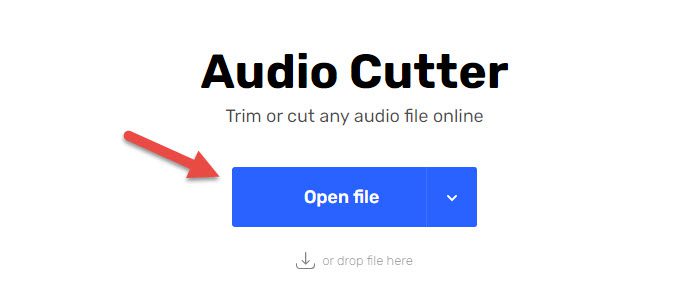
<p>Để cắt nhac bằng phần mềm Audio Cutter trực tuyến, bạn làm theo các bước sau đây:</p>

<p><strong>Bước 1</strong>: Đầu tiên bạn truy cập vào web, sau đó chọn&nbsp;<strong>Open File</strong>&nbsp;để chọn đoạn nhạc mà mình muốn cắt.</p>
<em>Website truy cập:&nbsp;https://mp3cut.net/</em>

<p><img alt="phan mem cat nhac audio cutter e1602904300675 - Top 4 Phần mềm Cắt nhạc MP3 Chuyên nghiệp, Miễn phí 2020 - Ben Computer" data-ll-status="loaded" data-pin-no-hover="true" height="298" sizes="(max-width: 698px) 100vw, 698px" src="https://ben.com.vn/tin-tuc/wp-content/uploads/2020/10/phan-mem-cat-nhac-audio-cutter-e1602904300675.jpg" srcset="https://ben.com.vn/tin-tuc/wp-content/uploads/2020/10/phan-mem-cat-nhac-audio-cutter-e1602904300675.jpg 698w, https://ben.com.vn/tin-tuc/wp-content/uploads/2020/10/phan-mem-cat-nhac-audio-cutter-e1602904300675-300x128.jpg 300w" title="phan mem cat nhac audio cutter e1602904300675 - Top 4 Phần mềm Cắt nhạc MP3 Chuyên nghiệp, Miễn phí 2020 - Ben Computer" width="698" /></p>

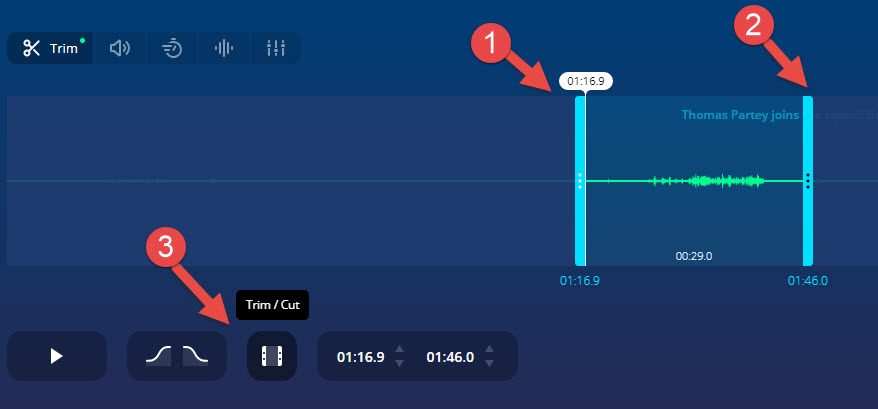
<p><strong>Bước 2</strong>: Sau khi đã chọn xong thì bạn tiến hành lựa chọn đoạn muốn cắt bỏ đi bằng cách kéo 2 thanh màu xanh ( như hình minh họa ) đến đoạn mà bạn muốn cắt bỏ. Sau đó nhấn<strong>&nbsp;Trim / Cut</strong></p>

<p><img alt="phan mem cat nhac audio cutter anh 2 - Top 4 Phần mềm Cắt nhạc MP3 Chuyên nghiệp, Miễn phí 2020 - Ben Computer" data-ll-status="loaded" data-pin-no-hover="true" height="409" sizes="(max-width: 878px) 100vw, 878px" src="https://ben.com.vn/tin-tuc/wp-content/uploads/2020/10/phan-mem-cat-nhac-audio-cutter-anh-2.jpg" srcset="https://ben.com.vn/tin-tuc/wp-content/uploads/2020/10/phan-mem-cat-nhac-audio-cutter-anh-2.jpg 878w, https://ben.com.vn/tin-tuc/wp-content/uploads/2020/10/phan-mem-cat-nhac-audio-cutter-anh-2-300x140.jpg 300w, https://ben.com.vn/tin-tuc/wp-content/uploads/2020/10/phan-mem-cat-nhac-audio-cutter-anh-2-768x358.jpg 768w, https://ben.com.vn/tin-tuc/wp-content/uploads/2020/10/phan-mem-cat-nhac-audio-cutter-anh-2-750x349.jpg 750w" title="phan mem cat nhac audio cutter anh 2 - Top 4 Phần mềm Cắt nhạc MP3 Chuyên nghiệp, Miễn phí 2020 - Ben Computer" width="878" /></p>

<p><strong>Bước 3</strong>: Sau khi đã cắt hoàn tất thì bạn ấn vào mục Save để lưu đoạn nhạc đã cắt thành công về.</p>

<h2><strong>2. Adobe Audition – Phần mềm xử lý, chỉnh sửa âm thanh chuyên nghiệp tốt nhất</strong></h2>

<figure aria-describedby="caption-attachment-11763" id="attachment_11763"><img alt="Adobe Audition - Phần mềm xử lý, chỉnh sửa âm thanh chuyên nghiệp tốt nhất" data-ll-status="loaded" data-pin-no-hover="true" height="540" sizes="(max-width: 960px) 100vw, 960px" src="https://ben.com.vn/tin-tuc/wp-content/uploads/2020/10/phan-mem-cat-nhac-adobe-audition.jpg" srcset="https://ben.com.vn/tin-tuc/wp-content/uploads/2020/10/phan-mem-cat-nhac-adobe-audition.jpg 960w, https://ben.com.vn/tin-tuc/wp-content/uploads/2020/10/phan-mem-cat-nhac-adobe-audition-300x169.jpg 300w, https://ben.com.vn/tin-tuc/wp-content/uploads/2020/10/phan-mem-cat-nhac-adobe-audition-768x432.jpg 768w, https://ben.com.vn/tin-tuc/wp-content/uploads/2020/10/phan-mem-cat-nhac-adobe-audition-750x422.jpg 750w" title="phan mem cat nhac adobe audition - Top 4 Phần mềm Cắt nhạc MP3 Chuyên nghiệp, Miễn phí 2020 - Ben Computer" width="960" />
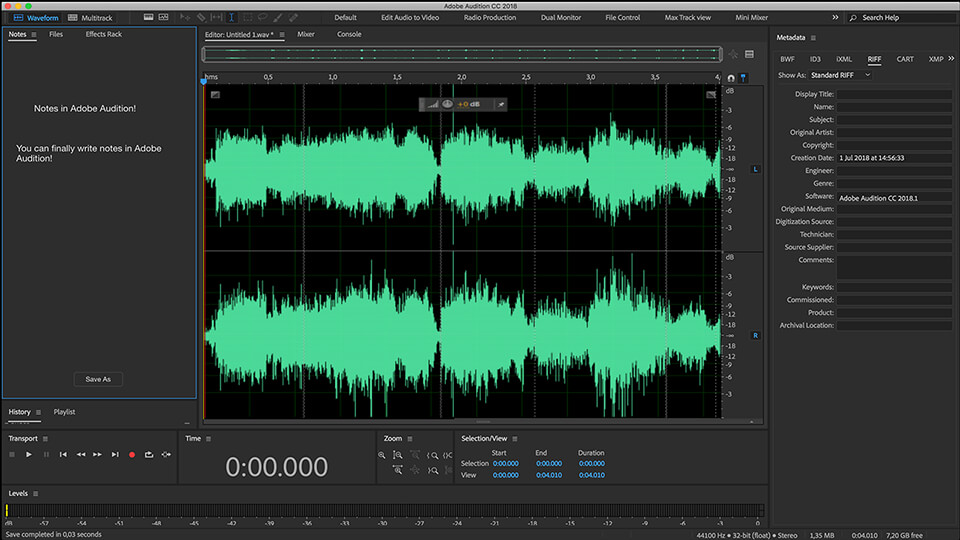
<figcaption id="caption-attachment-11763">Adobe Audition – Phần mềm xử lý, chỉnh sửa âm thanh chuyên nghiệp tốt nhất</figcaption>
</figure>

<p><strong>Adobe Audition</strong>&nbsp;là&nbsp;<strong>phần mềm cắt ghép và chỉnh sửa âm thanh chuyên nghiệp #1</strong>&nbsp;hiện nay. Phần mềm được phát triển bởi Adobe Systems với nhiều sản phẩm nổi tiếng như Adobe Photoshop, Adobe illustration,…Adobe Audition sẽ hỗ trợ bạn xử lý hầu hết các nhu cầu của bạn như cắt ghép âm thanh, thêm hiệu ứng, tăng giảm âm lượng Fadein fadeoutm… và lưu file audio ở nhiều định dạng khác nhau.</p>

<p>Và là phần mềm chuyên nghiệp với rất nhiều tính năng, Adobe illustrator cũng yêu cầu cao về phần cứng tối thiểu như:</p>

<ul>
	<li>Ram 4GB tối hiểu</li>
	<li>Bộ vi xử lý lõi hỗ trợ 64bit</li>
	<li>Hệ điều hành Windows 10</li>
	<li>Độ phân giản&nbsp;<a data-internallinksmanager029f6b8e52c="2" href="https://laptop127.vn" rel="noopener" target="_blank" title="màn hình máy tính">màn hình</a>&nbsp;1920 x 1080</li>
	<li>Hệ thống có khả năng OpenGL 2.0</li>
</ul>

<p>Chính vì vậy, nếu công việc của bạn phải thường xuyên cắt ghép video với nhiều yêu cầu về mặt kỹ thuật thì bạn nên chọn phần mềm Adobe Audition bởi nó rất đa năng và chuyên nghiệp.</p>

<p>Còn nếu, bạn chỉ muốn cắt ghép audio phục vụ công việc đột xuất thì nên sử dụng phần mềm cắt nhạc trực tuyến mà Ben Computer giới thiệu trong bài này nhé.</p>

<p>&nbsp;</p>

<h2><strong>3. X-Wave MP3 Cutter Joiner – Phần mềm cắt nhạc đơn giản</strong></h2>

<figure aria-describedby="caption-attachment-11765" id="attachment_11765"><img alt="X-Wave MP3 Cutter Joiner - Phần mềm cắt nhạc đơn giản" data-ll-status="loaded" data-pin-no-hover="true" height="464" sizes="(max-width: 640px) 100vw, 640px" src="https://ben.com.vn/tin-tuc/wp-content/uploads/2020/10/phan-mem-cat-nhac-xwave-mp3-cutter-joiner.jpg" srcset="https://ben.com.vn/tin-tuc/wp-content/uploads/2020/10/phan-mem-cat-nhac-xwave-mp3-cutter-joiner.jpg 640w, https://ben.com.vn/tin-tuc/wp-content/uploads/2020/10/phan-mem-cat-nhac-xwave-mp3-cutter-joiner-300x218.jpg 300w, https://ben.com.vn/tin-tuc/wp-content/uploads/2020/10/phan-mem-cat-nhac-xwave-mp3-cutter-joiner-120x86.jpg 120w" title="phan mem cat nhac xwave mp3 cutter joiner - Top 4 Phần mềm Cắt nhạc MP3 Chuyên nghiệp, Miễn phí 2020 - Ben Computer" width="640" />
<figcaption id="caption-attachment-11765">X-Wave MP3 Cutter Joiner – Phần mềm cắt nhạc đơn giản</figcaption>
</figure>

<p><strong>X-Wave MP3 Cutter Joiner</strong>&nbsp;là công cụ giúp bạn xử lý âm thanh Mp3 đa chức năng bao gồm các chức năng tiêu biểu như: ghi âm, cắt nhạc, biên tâm nhạc, chia file nhạc. Phần mềm cũng cung cấp nhiều hiệu ứng, điều này giúp bạn làm cho âm thanh audio trở nên sống động hơn rất nhiều.</p>

<p><em>Các tính năng khác của phần mềm X-Wave MP3 Cutter Joiner:&nbsp;</em></p>

<ul>
	<li>Cắt nhạc MP3</li>
	<li>Biên tập nhạc</li>
	<li>Ghép nhạc MP3 Joiner</li>
	<li>Ghi âm: ghi lại bất kỳ âm thanh nào phát ra từ loa máy tính</li>
	<li>Nhiều tính năng khác nữa.</li>
</ul>

<p>&nbsp;</p>

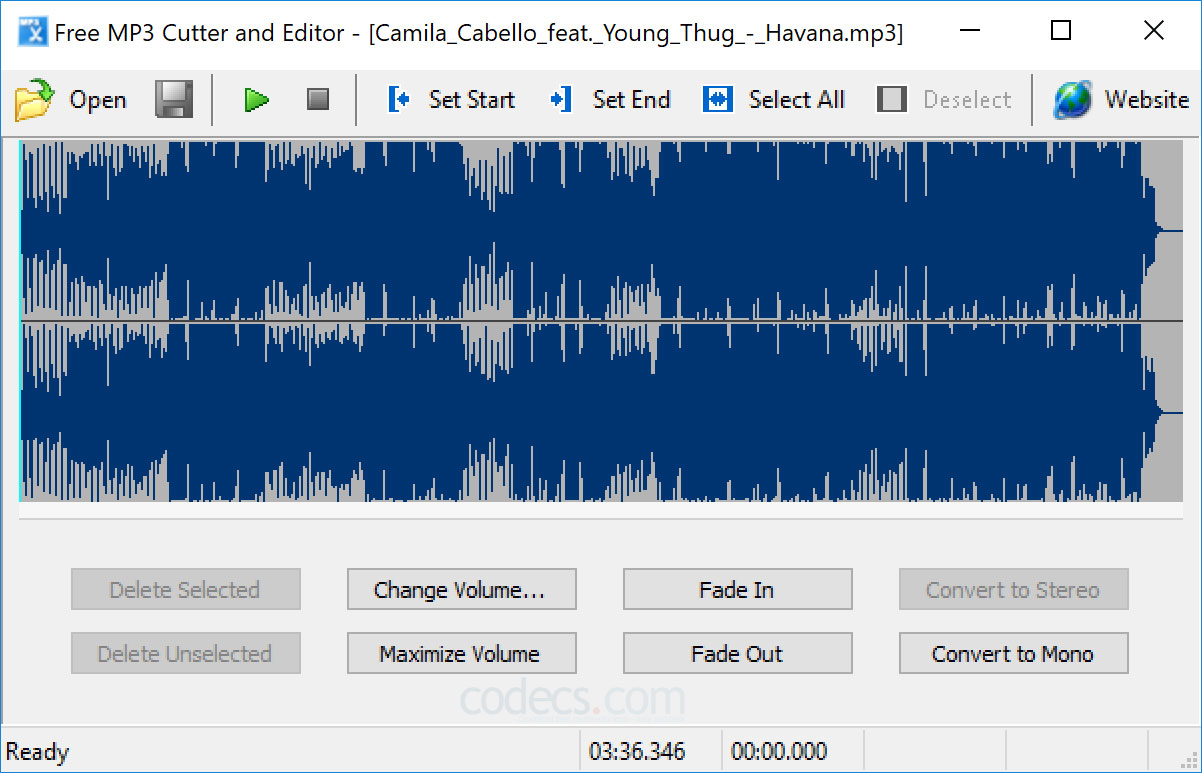
<h2><strong>4. Free MP3 Cutter and Editor – Phần mềm cắt nhạc đơn giản cho người mới</strong></h2>

<figure aria-describedby="caption-attachment-11764" id="attachment_11764"><img alt="Free MP3 Cutter and Editor - Phần mềm cắt nhạc đơn giản cho người mới" data-ll-status="loaded" data-pin-no-hover="true" height="773" sizes="(max-width: 1202px) 100vw, 1202px" src="https://ben.com.vn/tin-tuc/wp-content/uploads/2020/10/phan-mem-cat-nhac-free-mp3-cutter-and-editor.jpg" srcset="https://ben.com.vn/tin-tuc/wp-content/uploads/2020/10/phan-mem-cat-nhac-free-mp3-cutter-and-editor.jpg 1202w, https://ben.com.vn/tin-tuc/wp-content/uploads/2020/10/phan-mem-cat-nhac-free-mp3-cutter-and-editor-300x193.jpg 300w, https://ben.com.vn/tin-tuc/wp-content/uploads/2020/10/phan-mem-cat-nhac-free-mp3-cutter-and-editor-1024x659.jpg 1024w, https://ben.com.vn/tin-tuc/wp-content/uploads/2020/10/phan-mem-cat-nhac-free-mp3-cutter-and-editor-768x494.jpg 768w, https://ben.com.vn/tin-tuc/wp-content/uploads/2020/10/phan-mem-cat-nhac-free-mp3-cutter-and-editor-750x482.jpg 750w, https://ben.com.vn/tin-tuc/wp-content/uploads/2020/10/phan-mem-cat-nhac-free-mp3-cutter-and-editor-1140x733.jpg 1140w" title="phan mem cat nhac free mp3 cutter and editor - Top 4 Phần mềm Cắt nhạc MP3 Chuyên nghiệp, Miễn phí 2020 - Ben Computer" width="1202" />
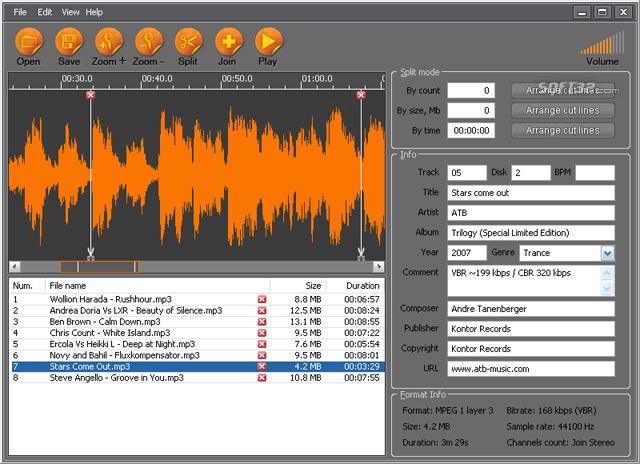
<figcaption id="caption-attachment-11764">Free MP3 Cutter and Editor – Phần mềm cắt nhạc đơn giản cho người mới</figcaption>
</figure>

<p>Tiêp theo, mình sẽ giới thiệu thêm một&nbsp;<strong>phần mềm cắt nhạc rất dễ dùng và miễn phí</strong>, đó là<strong>&nbsp;Free MP3 Cutter and Editor</strong>.</p>

<p>Phần mềm này phù hợp với nhiều bạn không chuyên, không cần phải am hiểu về máy tính để cài phần mềm hay xử lý kỹ thuật thì bạn vẫn có thể cắt nhạc dễ dàng.</p>

<p>Một số tính năng nổi bật của phần mềm Free MP3 Cutter and Editor như:</p>

<ul>
	<li>Xóa một đoạn nhạc bất kỳ từ file Audio</li>
	<li>Hỗ trợ định dạng MP3, WAV</li>
	<li>Thay đổi âm lượng của file âm thanh đơn giản</li>
	<li>Hỗ trợ nghe trước âm thanh đoạn âm thanh bạn chuẩn bị cắt.</li>
</ul>

<p>&nbsp;</p>

<hr  />
<p>Với gợi ý về những phần mềm cắt nhạc online miễn phí được ưa chuộng nhất hiện nay này chắc chặn quá trình cắt nhạc của bạn đã diễn ra đơn giản và nhanh chóng hơn rất là nhiều.</p>

<p>Mọi vấn đề thắc mắc nào khác cần giải đáp các bạn đừng ngại mà hãy chủ động liên hệ tới số hotline để được nhân viên tư vấn nhanh chóng.</p>

<p><em>Chúc các bạn cắt nhạc thành công.</em></p>
		</div>
	</div>
	<div id="footer" class="clearfix">
		<div id="url">
			<strong>URL của bản tin này: </strong><a href="http://www.laptop127.vn/news/tin-tuc/laptop127-top-4-phan-mem-cat-nhac-mp3-chuyen-nghiep-mien-phi-2020-95.html" title="LAPTOP127 - Top 4 Phần mềm Cắt nhạc MP3 Chuyên nghiệp, Miễn phí 2020">http://www.laptop127.vn/news/tin-tuc/laptop127-top-4-phan-mem-cat-nhac-mp3-chuyen-nghiep-mien-phi-2020-95.html</a>

		</div>
		<div class="clear"></div>
		<div class="copyright">
			&copy; Laptop Cũ Thái Nguyên - Laptop127
		</div>
		<div id="contact">
			<a href="mailto:webmaster@laptop127.vn">webmaster@laptop127.vn</a>
		</div>
	</div>
</div>
        <div id="timeoutsess" class="chromeframe">
            Bạn đã không sử dụng Site, <a onclick="timeoutsesscancel();" href="http://www.laptop127.vn/#">Bấm vào đây để duy trì trạng thái đăng nhập</a>. Thời gian chờ: <span id="secField"> 60 </span> giây
        </div>
        <div id="openidResult" class="nv-alert" style="display:none"></div>
        <div id="openidBt" data-result="" data-redirect=""></div>
<div id="run_cronjobs" style="visibility:hidden;display:none;"><img alt="" src="/index.php?second=cronjobs&amp;p=z6kEmJPu" width="1" height="1" /></div>
<script src="http://www.laptop127.vn/assets/js/jquery/jquery.min.js"></script>
<script>var nv_base_siteurl="/",nv_lang_data="vi",nv_lang_interface="vi",nv_name_variable="nv",nv_fc_variable="op",nv_lang_variable="language",nv_module_name="news",nv_func_name="savefile",nv_is_user=0, nv_my_ofs=7,nv_my_abbr="ICT",nv_cookie_prefix="nv4c_b9F0Z",nv_check_pass_mstime=1738000,nv_area_admin=0,nv_safemode=0,theme_responsive=0,nv_is_recaptcha=0;</script>
<script src="http://www.laptop127.vn/assets/js/language/vi.js"></script>
<script src="http://www.laptop127.vn/assets/js/global.js"></script>
<script src="http://www.laptop127.vn/themes/laptop127/js/news.js"></script>
<script src="http://www.laptop127.vn/themes/laptop127/js/main.js"></script>
<script>
        window.fbAsyncInit = function() {
          FB.init({
            xfbml            : true,
            version          : 'v6.0'
          });
        };

        (function(d, s, id) {
        var js, fjs = d.getElementsByTagName(s)[0];
        if (d.getElementById(id)) return;
        js = d.createElement(s); js.id = id;
        js.src = 'https://connect.facebook.net/vi_VN/sdk/xfbml.customerchat.js';
        fjs.parentNode.insertBefore(js, fjs);
      }(document, 'script', 'facebook-jssdk'));</script>
<script type="text/javascript">
	$(document).ready(function() {
		var aboveHeight = 0;
			$(window).scroll(function(){
				if ($(window).scrollTop() > aboveHeight){
				$('sticknav').addClass('fixed').css('top','0').next().css('padding-top','60px');
				} else {
			   $('sticknav').removeClass('fixed').next().css('padding-top','0');
				}
			});
	});
</script>
<script src="http://www.laptop127.vn/themes/laptop127/js/bootstrap.min.js"></script>
</body>
</html>