<!DOCTYPE html>
	<html lang="vi" xmlns="http://www.w3.org/1999/xhtml" prefix="og: http://ogp.me/ns#">
	<head>
<title>&#40;LAPTOP127 &#41; Những cài đặt giúp Windows 10 của bạn hoạt động “hết tốc lực” &#40;P1&#41;</title>
<meta name="description" content="&#40;LAPTOP127 &#41; Những cài đặt giúp Windows 10 của bạn hoạt động “hết tốc lực” &#40;P1&#41; - Savefile - Tin tức -...">
<meta name="keywords" content="apple thai nguyen,  ishop thai nguyen,  iphone thai nguyen,  macbook thai nguyen,  ipad thai nguyen,  laptop cu thai nguyen">
<meta name="news_keywords" content="apple thai nguyen,  ishop thai nguyen,  iphone thai nguyen,  macbook thai nguyen,  ipad thai nguyen,  laptop cu thai nguyen">
<meta name="author" content="Laptop Cũ Thái Nguyên - Laptop127">
<meta name="copyright" content="Laptop Cũ Thái Nguyên - Laptop127 [webmaster@laptop127.vn]">
<meta name="robots" content="index, archive, follow, noodp">
<meta name="googlebot" content="index,archive,follow,noodp">
<meta name="msnbot" content="all,index,follow">
<meta name="generator" content="NukeViet v4.4">
<meta http-equiv="Content-Type" content="text/html; charset=utf-8">
<meta property="og:title" content="&#40;LAPTOP127 &#41; Những cài đặt giúp Windows 10 của bạn hoạt động “hết tốc lực” &#40;P1&#41;">
<meta property="og:type" content="website">
<meta property="og:description" content="Savefile - Tin tức - http&#x3A;&#x002F;&#x002F;www.laptop127.vn&#x002F;news&#x002F;savefile&#x002F;tin-tuc&#x002F;laptop127-nhung-cai-dat-giup-windows-10-cua-ban-hoat-dong-het-toc-luc-p1-120.html">
<meta property="og:site_name" content="Laptop Cũ Thái Nguyên - Laptop127">
<meta property="og:url" content="http://laptop127.vn/news/tin-tuc/laptop127-nhung-cai-dat-giup-windows-10-cua-ban-hoat-dong-het-toc-luc-p1-120.html">
<link rel="shortcut icon" href="http://www.laptop127.vn/uploads/about/logo.png">
<link rel="canonical" href="http://laptop127.vn/news/tin-tuc/laptop127-nhung-cai-dat-giup-windows-10-cua-ban-hoat-dong-het-toc-luc-p1-120.html">
<link rel="alternate" href="http://www.laptop127.vn/news/rss/" title="Tin tức" type="application/rss+xml">
<link rel="alternate" href="http://www.laptop127.vn/news/rss/tin-tuc/" title="Tin tức - Tin tức" type="application/rss+xml">
<link rel="alternate" href="http://www.laptop127.vn/news/rss/kinh-nghiem-thu-thuat/" title="Tin tức - TRẢ GÓP TẠI LAPTOP127" type="application/rss+xml">
<link rel="alternate" href="http://www.laptop127.vn/news/rss/khuyen-mai/" title="Tin tức - Khuyến mãi" type="application/rss+xml">
<link rel="alternate" href="http://www.laptop127.vn/news/rss/danh-gia/" title="Tin tức - Đánh giá" type="application/rss+xml">
<link rel="alternate" href="http://www.laptop127.vn/news/rss/thu-thuat/" title="Tin tức - THỦ THUẬT" type="application/rss+xml">
<link rel="preload" as="script" href="http://www.laptop127.vn/assets/js/jquery/jquery.min.js">
<link rel="preload" as="script" href="http://www.laptop127.vn/assets/js/language/vi.js">
<link rel="preload" as="script" href="http://www.laptop127.vn/assets/js/global.js">
<link rel="preload" as="script" href="http://www.laptop127.vn/themes/laptop127/js/news.js">
<link rel="preload" as="script" href="http://www.laptop127.vn/themes/laptop127/js/main.js">
<link rel="preload" as="script" href="http://www.laptop127.vn/themes/laptop127/js/bootstrap.min.js">
<link rel="StyleSheet" type="text/css" href="http://laptop127.vn/fonts/css/font.css" />
<link rel="StyleSheet" href="http://www.laptop127.vn/assets/css/font-awesome.min.css">
<link rel="StyleSheet" href="http://www.laptop127.vn/themes/laptop127/css/bootstrap.non-responsive.css">
<link rel="StyleSheet" href="http://www.laptop127.vn/themes/laptop127/css/style.css">
<link rel="StyleSheet" href="http://www.laptop127.vn/themes/laptop127/css/style.non-responsive.css">
<link rel="StyleSheet" href="http://www.laptop127.vn/themes/laptop127/css/news.css">
<link rel="StyleSheet" href="http://www.laptop127.vn/assets/css/laptop127.vi.0.css">
<style>
	body{background: #fff;}
</style>
</head>
<body>	
<!-- Load Facebook SDK for JavaScript -->
      <div id="fb-root"></div>
      <!-- Your customer chat code -->
      <div class="fb-customerchat"
        attribution=setup_tool
        page_id="356477544865793"
  theme_color="#0a9222"
  logged_in_greeting="Xin chào! Bạn cần hỗ trợ vui lòng inbox?"
  logged_out_greeting="Xin chào! Bạn cần hỗ trợ vui lòng inbox?">
      </div>
<div id="print">
	<div id="hd_print">
		<h2 class="pull-left">Laptop Cũ Thái Nguyên - Laptop127</h2>
		<p class="pull-right"><a title="Laptop Cũ Thái Nguyên - Laptop127" href="http://www.laptop127.vn/">http://www.laptop127.vn</a></p>
	</div>
	<div class="clear"></div>
	<hr />
	<div id="content">
		<h1>&#40;LAPTOP127 &#41; Những cài đặt giúp Windows 10 của bạn hoạt động “hết tốc lực” &#40;P1&#41;</h1>
		<ul class="list-inline">
			<li>Thứ ba - 05/01/2021 09:03</li>
			<li class="hidden-print txtrequired"><em class="fa fa-print">&nbsp;</em><a title="In ra" href="javascript:;" onclick="window.print()">In ra</a></li>
			<li class="hidden-print txtrequired"><em class="fa fa-power-off">&nbsp;</em><a title="Đóng cửa sổ này" href="javascript:;" onclick="window.close()">Đóng cửa sổ này</a></li>
		</ul>
		<div class="clear"></div>
		<div id="hometext">
		</div>
		<div id="bodytext" class="clearfix">
			<h2><strong>Sau một thời gian dài sử dụng, bạn có gặp phải tình trạng Windows 10 của mình dần chậm lại và khởi động khá lâu không? Rất nhiều người cũng gặp tình trạng tương tự. Vậy đâu là giải pháp?</strong></h2>

<p>Trong bài viết này, LAPTOP127&nbsp;sẽ giới thiệu đến bạn những cài đặt cực đơn giản sẽ giúp cải thiện tốc độ hoạt động cũng như khởi động Windows 10 của bạn đấy.</p>

<h3><strong>Tắt ứng dụng chạy trong nền</strong></h3>

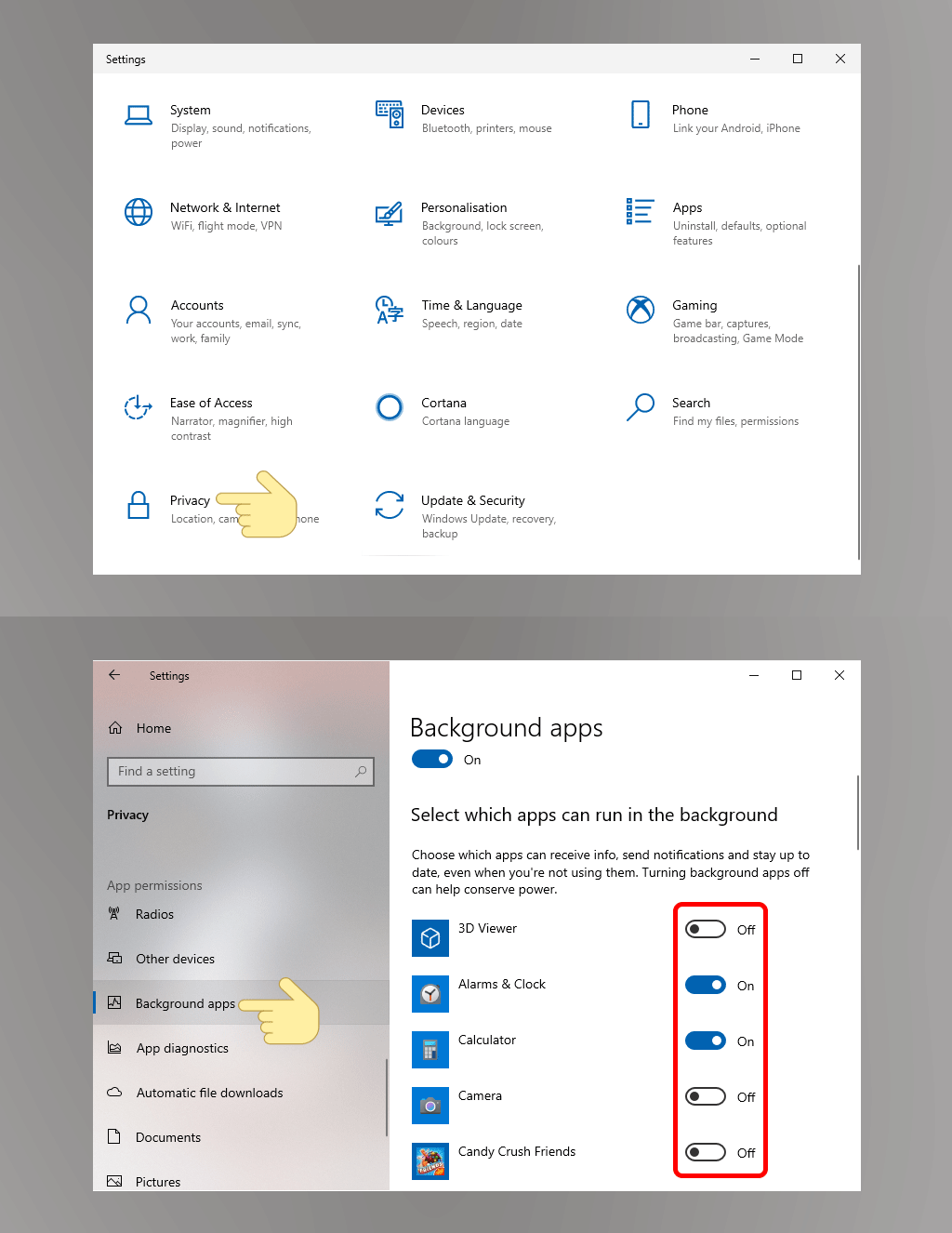
<p>Những ứng dụng chạy ngầm sẽ tiêu tốn nhiều tài nguyên của máy tính, khiến chúng hoạt động chậm hơn khá nhiều. Vì thế, tắt các ứng dụng này đi sẽ giúp cải thiện hiệu suất hoạt động của máy tính đấy.</p>

<p>Để tắt ứng dụng chạy trong nền, bạn vào&nbsp;<strong>Settings &gt; Privacy &gt; Background apps &gt; Tắt những ứng dụng chạy nền không cần thiết</strong>.</p>

<p><img alt="Sforum - Trang thông tin công nghệ mới nhất 1-7 Những cài đặt giúp Windows 10 của bạn hoạt động &#039;hết tốc lực&#039; (P1) " data-pin-no-hover="true" height="663" loading="lazy" src="https://cellphones.com.vn/sforum/wp-content/uploads/2021/01/1-7.gif" title="Sforum - Trang thông tin công nghệ mới nhất 1-7 Những cài đặt giúp Windows 10 của bạn hoạt động &#039;hết tốc lực&#039; (P1) " width="1024" /></p>

<h3><strong>Dọn sạch ổ đĩa</strong></h3>

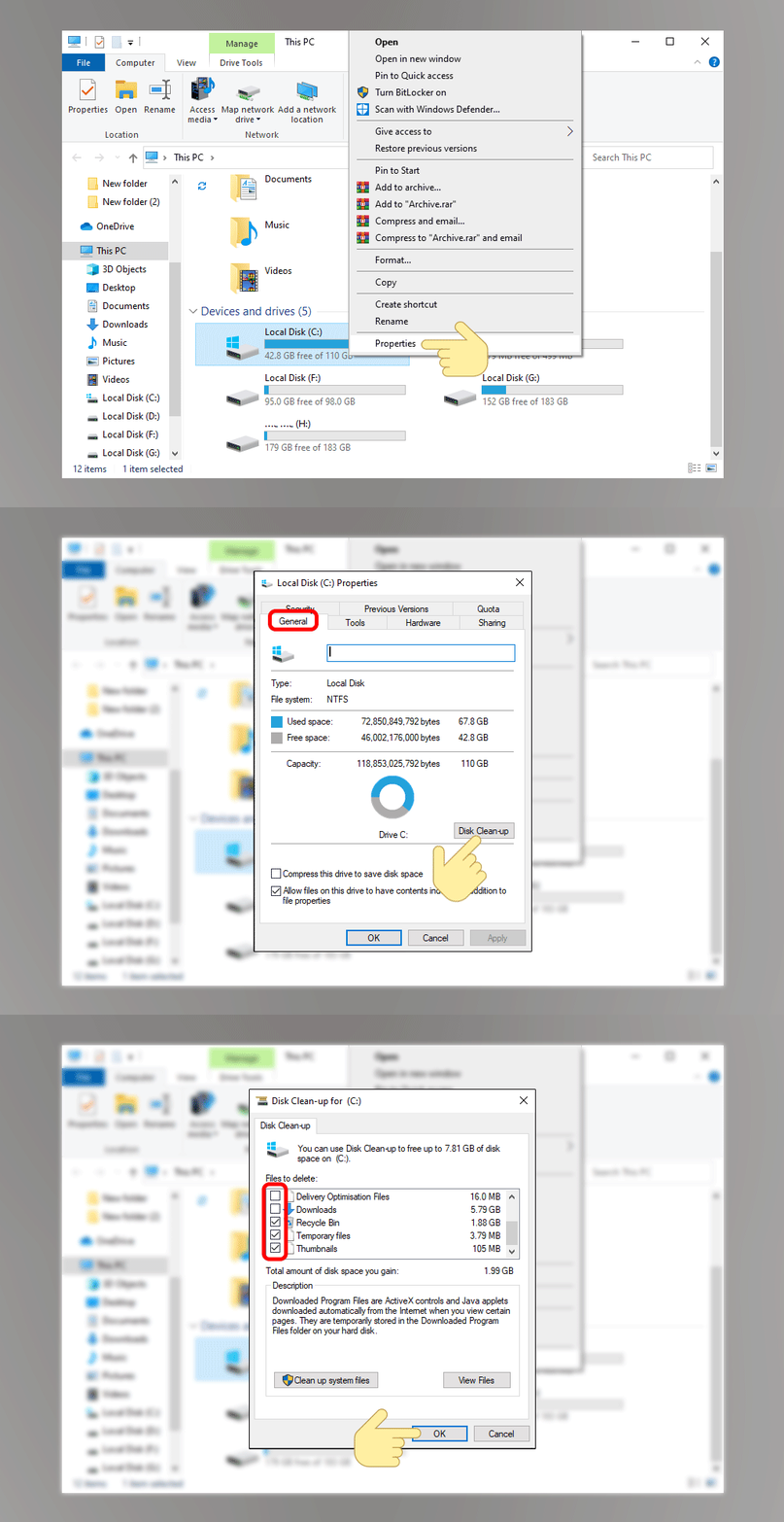
<p>Khi máy tính chứa nhiều dữ liệu, chúng sẽ chiếm nhiều không gian bộ nhớ và làm chậm đi các hoạt động của máy tính. Dọn sạch các dữ liệu không cần thiết trong các ổ đĩa sẽ giúp máy tính của bạn hoạt động nhanh hơn.</p>

<p>Bạn truy cập vào&nbsp;<strong>This PC &gt; nhấp chuột phải vào Local Disk (C:) &gt; Properties.&nbsp;</strong><strong>Tại mục General, bạn click vào Disk Cleanup tại Capacity &gt; tick vào file bạn muốn xóa &gt; OK để xóa chúng đi</strong>.</p>

<p><img alt="Sforum - Trang thông tin công nghệ mới nhất 2-7 Những cài đặt giúp Windows 10 của bạn hoạt động &#039;hết tốc lực&#039; (P1) " data-pin-no-hover="true" height="663" loading="lazy" src="https://cellphones.com.vn/sforum/wp-content/uploads/2021/01/2-7.gif" title="Sforum - Trang thông tin công nghệ mới nhất 2-7 Những cài đặt giúp Windows 10 của bạn hoạt động &#039;hết tốc lực&#039; (P1) " width="1024" /></p>

<h3><strong>Bật tính năng khởi động nhanh</strong></h3>

<p>Tính năng Khởi động nhanh (Fast Startup) sẽ giúp máy tính của bạn khởi động nhanh hơn bằng cách giảm <a href="http://laptop127.vn">thời gian</a> khởi động, sử dụng bộ nhớ đệm cho một số tài nguyên cần thiết vào một file duy nhất trên ổ cứng.</p>

<p>Bạn mở&nbsp;<strong>Control Panel &gt; Hardware and Sound &gt; Power Options &gt; Change what the power buttons do &gt; Change settings that are currently unavailable &gt; Turn on fast startup (recommended) &gt; Save changes</strong>.</p>

<h3><strong>Tối ưu hóa bộ nhớ ảo</strong></h3>

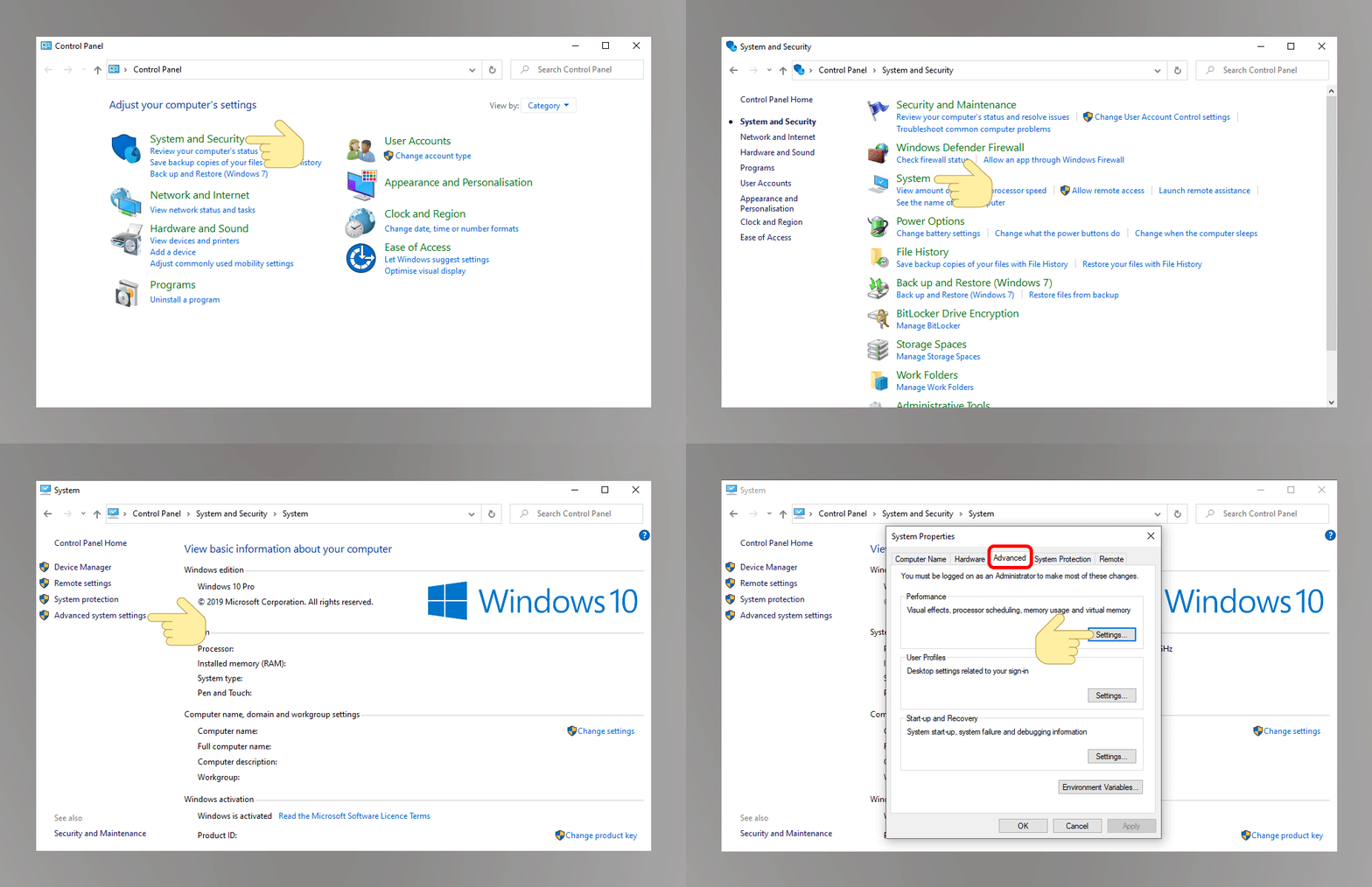
<p>Nếu máy tính của bạn có dung lượng RAM thấp, một trong những cách tối ưu để cải thiện hiệu suất hoạt động chính là sử dụng bộ nhớ ảo.</p>

<p><strong>Bước 1</strong>: Bạn truy cập vào&nbsp;<strong>Control Panel &gt; System and Security &gt; System &gt; Advanced system settings &gt; Advanced &gt; Settings tại Performance</strong>.</p>

<p><img alt="Sforum - Trang thông tin công nghệ mới nhất 3-7 Những cài đặt giúp Windows 10 của bạn hoạt động &#039;hết tốc lực&#039; (P1) " data-pin-no-hover="true" height="663" loading="lazy" src="https://cellphones.com.vn/sforum/wp-content/uploads/2021/01/3-7.gif" title="Sforum - Trang thông tin công nghệ mới nhất 3-7 Những cài đặt giúp Windows 10 của bạn hoạt động &#039;hết tốc lực&#039; (P1) " width="1024" /></p>

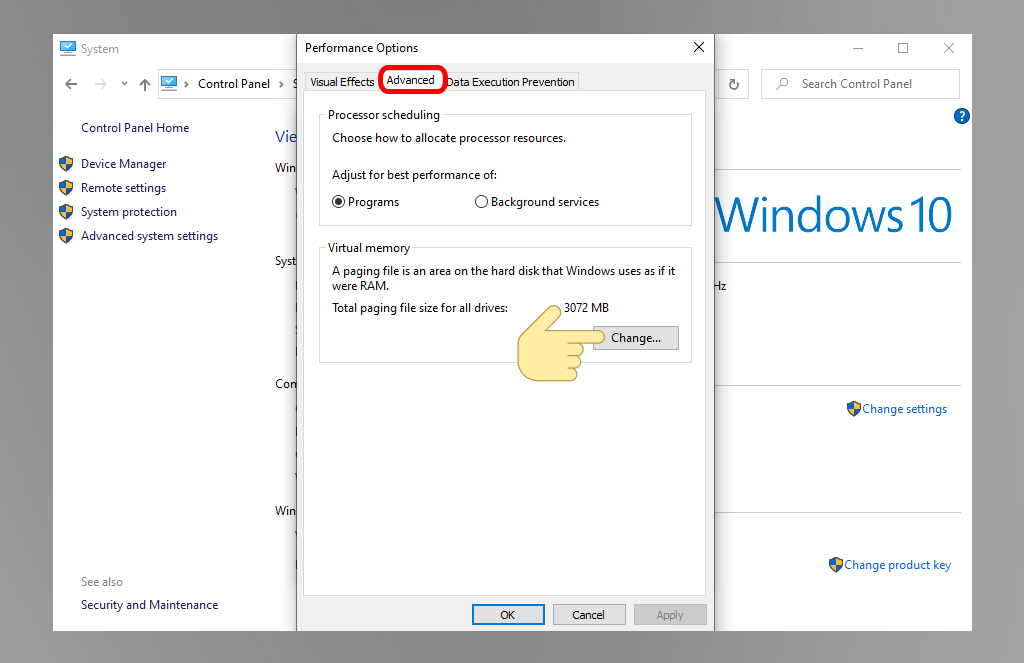
<p><strong>Bước 2:</strong>&nbsp;Bạn nhấn vào&nbsp;<strong>Advanced &gt; Change&nbsp;</strong>tại mục&nbsp;<strong>Virtual Memory</strong>.</p>

<p><img alt="Sforum - Trang thông tin công nghệ mới nhất 4-7 Những cài đặt giúp Windows 10 của bạn hoạt động &#039;hết tốc lực&#039; (P1) " data-pin-no-hover="true" height="663" loading="lazy" sizes="(max-width: 1024px) 100vw, 1024px" src="https://cellphones.com.vn/sforum/wp-content/uploads/2021/01/4-7.jpg" srcset="https://cellphones.com.vn/sforum/wp-content/uploads/2021/01/4-7.jpg 1024w, https://cellphones.com.vn/sforum/wp-content/uploads/2021/01/4-7-600x388.jpg 600w, https://cellphones.com.vn/sforum/wp-content/uploads/2021/01/4-7-960x622.jpg 960w, https://cellphones.com.vn/sforum/wp-content/uploads/2021/01/4-7-768x497.jpg 768w, https://cellphones.com.vn/sforum/wp-content/uploads/2021/01/4-7-750x486.jpg 750w" title="Sforum - Trang thông tin công nghệ mới nhất 4-7 Những cài đặt giúp Windows 10 của bạn hoạt động &#039;hết tốc lực&#039; (P1) " width="1024" /></p>

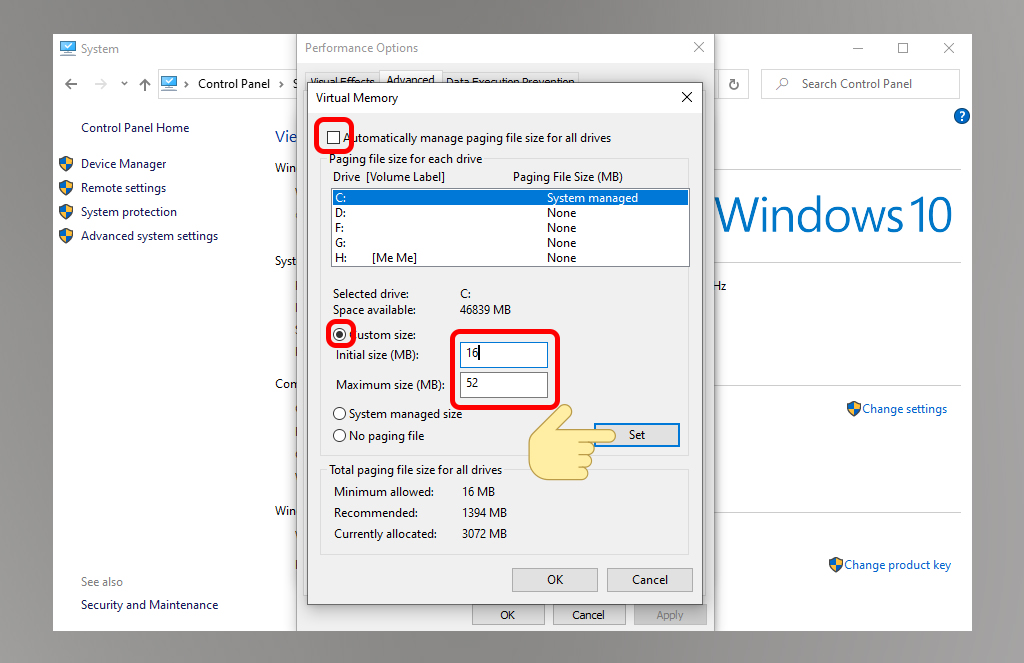
<p><strong>Bước 3</strong>: Tiếp đến, bạn&nbsp;<strong>bỏ chọn Automatically manage paging file size for all drives</strong>. Chọn ổ&nbsp;<strong>C: &gt; Custome size&nbsp;</strong>&nbsp;để tùy chỉnh kích thước. Bạn thiết lập&nbsp;<strong>Initial size (MB) bằng với kích thước của RAM</strong>&nbsp;và&nbsp;<strong>Maximum size (MB) bằng gấp đôi kích thước RAM</strong>&nbsp;của bạn. Sau đó, nhấn vào&nbsp;<strong>Set &gt; OK</strong>.</p>

<p><img alt="Sforum - Trang thông tin công nghệ mới nhất 5-7 Những cài đặt giúp Windows 10 của bạn hoạt động &#039;hết tốc lực&#039; (P1) " data-pin-no-hover="true" height="663" loading="lazy" sizes="(max-width: 1024px) 100vw, 1024px" src="https://cellphones.com.vn/sforum/wp-content/uploads/2021/01/5-7.jpg" srcset="https://cellphones.com.vn/sforum/wp-content/uploads/2021/01/5-7.jpg 1024w, https://cellphones.com.vn/sforum/wp-content/uploads/2021/01/5-7-600x388.jpg 600w, https://cellphones.com.vn/sforum/wp-content/uploads/2021/01/5-7-960x622.jpg 960w, https://cellphones.com.vn/sforum/wp-content/uploads/2021/01/5-7-768x497.jpg 768w, https://cellphones.com.vn/sforum/wp-content/uploads/2021/01/5-7-750x486.jpg 750w" title="Sforum - Trang thông tin công nghệ mới nhất 5-7 Những cài đặt giúp Windows 10 của bạn hoạt động &#039;hết tốc lực&#039; (P1) " width="1024" /></p>

<h3><strong>Tắt hiệu ứng <a href="http://laptop127.vn">đồ họa</a>, biểu tượng trong suốt</strong></h3>

<p>Hiệu ứng đồ họa và tính năng biểu tượng trong suốt sẽ “ngốn” kha khá dung lượng của máy và khiến Windows 10 của bạn hoạt động chậm đi trông thấy. Tắt những tính năng này đi sẽ giúp cải thiện tình trạng đấy.</p>

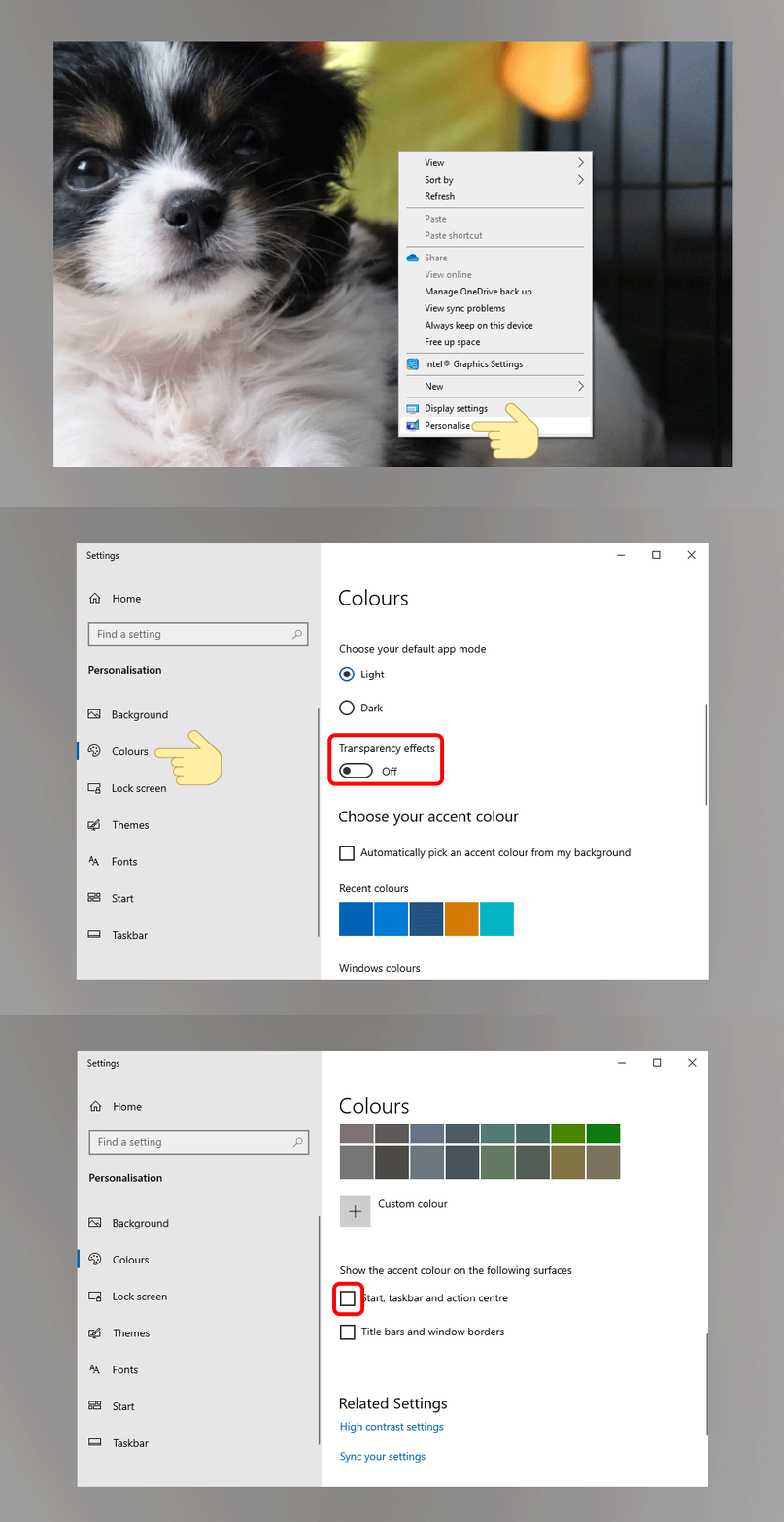
<p>Bạn&nbsp;<strong>click chuột phải</strong>&nbsp;vào giao diện nền&nbsp;<strong>Desktop &gt; Personalize &gt; Colors &gt; Transparent Effect &gt; Off &gt;</strong>&nbsp;<strong>bỏ tick</strong>&nbsp;<strong>Show color on Start, Taskbar and Action Center</strong>.</p>

<p><img alt="Sforum - Trang thông tin công nghệ mới nhất 6-7 Những cài đặt giúp Windows 10 của bạn hoạt động &#039;hết tốc lực&#039; (P1) " data-pin-no-hover="true" height="663" loading="lazy" src="https://cellphones.com.vn/sforum/wp-content/uploads/2021/01/6-7.gif" title="Sforum - Trang thông tin công nghệ mới nhất 6-7 Những cài đặt giúp Windows 10 của bạn hoạt động &#039;hết tốc lực&#039; (P1) " width="1024" /></p>

<h3><strong>Tạm kết:</strong></h3>

<p>Hy vọng với những thao tác trên đây, Windows 10 của bạn sẽ cải thiện được hiệu suất hoạt động của mình nhé. Chúc bạn thành công.</p>
		</div>
	</div>
	<div id="footer" class="clearfix">
		<div id="url">
			<strong>URL của bản tin này: </strong><a href="http://www.laptop127.vn/news/tin-tuc/laptop127-nhung-cai-dat-giup-windows-10-cua-ban-hoat-dong-het-toc-luc-p1-120.html" title="&#40;LAPTOP127 &#41; Những cài đặt giúp Windows 10 của bạn hoạt động “hết tốc lực” &#40;P1&#41;">http://www.laptop127.vn/news/tin-tuc/laptop127-nhung-cai-dat-giup-windows-10-cua-ban-hoat-dong-het-toc-luc-p1-120.html</a>

		</div>
		<div class="clear"></div>
		<div class="copyright">
			&copy; Laptop Cũ Thái Nguyên - Laptop127
		</div>
		<div id="contact">
			<a href="mailto:webmaster@laptop127.vn">webmaster@laptop127.vn</a>
		</div>
	</div>
</div>
        <div id="timeoutsess" class="chromeframe">
            Bạn đã không sử dụng Site, <a onclick="timeoutsesscancel();" href="http://www.laptop127.vn/#">Bấm vào đây để duy trì trạng thái đăng nhập</a>. Thời gian chờ: <span id="secField"> 60 </span> giây
        </div>
        <div id="openidResult" class="nv-alert" style="display:none"></div>
        <div id="openidBt" data-result="" data-redirect=""></div>
<script src="http://www.laptop127.vn/assets/js/jquery/jquery.min.js"></script>
<script>var nv_base_siteurl="/",nv_lang_data="vi",nv_lang_interface="vi",nv_name_variable="nv",nv_fc_variable="op",nv_lang_variable="language",nv_module_name="news",nv_func_name="savefile",nv_is_user=0, nv_my_ofs=7,nv_my_abbr="ICT",nv_cookie_prefix="nv4c_b9F0Z",nv_check_pass_mstime=1738000,nv_area_admin=0,nv_safemode=0,theme_responsive=0,nv_is_recaptcha=0;</script>
<script src="http://www.laptop127.vn/assets/js/language/vi.js"></script>
<script src="http://www.laptop127.vn/assets/js/global.js"></script>
<script src="http://www.laptop127.vn/themes/laptop127/js/news.js"></script>
<script src="http://www.laptop127.vn/themes/laptop127/js/main.js"></script>
<script>
        window.fbAsyncInit = function() {
          FB.init({
            xfbml            : true,
            version          : 'v6.0'
          });
        };

        (function(d, s, id) {
        var js, fjs = d.getElementsByTagName(s)[0];
        if (d.getElementById(id)) return;
        js = d.createElement(s); js.id = id;
        js.src = 'https://connect.facebook.net/vi_VN/sdk/xfbml.customerchat.js';
        fjs.parentNode.insertBefore(js, fjs);
      }(document, 'script', 'facebook-jssdk'));</script>
<script type="text/javascript">
	$(document).ready(function() {
		var aboveHeight = 0;
			$(window).scroll(function(){
				if ($(window).scrollTop() > aboveHeight){
				$('sticknav').addClass('fixed').css('top','0').next().css('padding-top','60px');
				} else {
			   $('sticknav').removeClass('fixed').next().css('padding-top','0');
				}
			});
	});
</script>
<script src="http://www.laptop127.vn/themes/laptop127/js/bootstrap.min.js"></script>
</body>
</html>