<!DOCTYPE html>
	<html lang="vi" xmlns="http://www.w3.org/1999/xhtml" prefix="og: http://ogp.me/ns#">
	<head>
<title>LAPTOP127 Cách chọn mua laptop học online phù hợp mùa dịch Covid-19</title>
<meta name="description" content="LAPTOP127 Cách chọn mua laptop học online phù hợp mùa dịch Covid-19 - Savefile - Tin tức -...">

<meta name="keywords" content="apple thai nguyen,  ishop thai nguyen,  iphone thai nguyen,  macbook thai nguyen,  ipad thai nguyen,  laptop cu thai nguyen">
<meta name="news_keywords" content="apple thai nguyen,  ishop thai nguyen,  iphone thai nguyen,  macbook thai nguyen,  ipad thai nguyen,  laptop cu thai nguyen">
<meta name="author" content="Laptop Cũ Thái Nguyên - Laptop127">
<meta name="copyright" content="Laptop Cũ Thái Nguyên - Laptop127 [webmaster@laptop127.vn]">
<meta name="robots" content="index, archive, follow, noodp">
<meta name="googlebot" content="index,archive,follow,noodp">
<meta name="msnbot" content="all,index,follow">
<meta name="generator" content="NukeViet v4.4">
<meta http-equiv="Content-Type" content="text/html; charset=utf-8">
<meta property="og:title" content="LAPTOP127 Cách chọn mua laptop học online phù hợp mùa dịch Covid-19">
<meta property="og:type" content="website">
<meta property="og:description" content="Savefile - Tin tức - http&#x3A;&#x002F;&#x002F;www.laptop127.vn&#x002F;news&#x002F;savefile&#x002F;tin-tuc&#x002F;laptop127-cach-chon-mua-laptop-hoc-online-phu-hop-mua-dich-covid-19-133.html">
<meta property="og:site_name" content="Laptop Cũ Thái Nguyên - Laptop127">
<meta property="og:url" content="http://laptop127.vn/news/tin-tuc/laptop127-cach-chon-mua-laptop-hoc-online-phu-hop-mua-dich-covid-19-133.html">
<link rel="shortcut icon" href="http://www.laptop127.vn/uploads/about/logo.png">
<link rel="canonical" href="http://laptop127.vn/news/tin-tuc/laptop127-cach-chon-mua-laptop-hoc-online-phu-hop-mua-dich-covid-19-133.html">
<link rel="alternate" href="http://www.laptop127.vn/news/rss/" title="Tin tức" type="application/rss+xml">
<link rel="alternate" href="http://www.laptop127.vn/news/rss/tin-tuc/" title="Tin tức - Tin tức" type="application/rss+xml">
<link rel="alternate" href="http://www.laptop127.vn/news/rss/kinh-nghiem-thu-thuat/" title="Tin tức - TRẢ GÓP TẠI LAPTOP127" type="application/rss+xml">
<link rel="alternate" href="http://www.laptop127.vn/news/rss/khuyen-mai/" title="Tin tức - Khuyến mãi" type="application/rss+xml">
<link rel="alternate" href="http://www.laptop127.vn/news/rss/danh-gia/" title="Tin tức - Đánh giá" type="application/rss+xml">
<link rel="alternate" href="http://www.laptop127.vn/news/rss/thu-thuat/" title="Tin tức - THỦ THUẬT" type="application/rss+xml">
<link rel="preload" as="script" href="http://www.laptop127.vn/assets/js/jquery/jquery.min.js">
<link rel="preload" as="script" href="http://www.laptop127.vn/assets/js/language/vi.js">
<link rel="preload" as="script" href="http://www.laptop127.vn/assets/js/global.js">
<link rel="preload" as="script" href="http://www.laptop127.vn/themes/laptop127/js/news.js">
<link rel="preload" as="script" href="http://www.laptop127.vn/themes/laptop127/js/main.js">
<link rel="preload" as="script" href="http://www.laptop127.vn/themes/laptop127/js/bootstrap.min.js">
<link rel="StyleSheet" type="text/css" href="http://laptop127.vn/fonts/css/font.css" />
<link rel="StyleSheet" href="http://www.laptop127.vn/assets/css/font-awesome.min.css">
<link rel="StyleSheet" href="http://www.laptop127.vn/themes/laptop127/css/bootstrap.non-responsive.css">
<link rel="StyleSheet" href="http://www.laptop127.vn/themes/laptop127/css/style.css">
<link rel="StyleSheet" href="http://www.laptop127.vn/themes/laptop127/css/style.non-responsive.css">
<link rel="StyleSheet" href="http://www.laptop127.vn/themes/laptop127/css/news.css">
<link rel="StyleSheet" href="http://www.laptop127.vn/assets/css/laptop127.vi.0.css">
<style>
	body{background: #fff;}
</style>
</head>
<body>	
<!-- Load Facebook SDK for JavaScript -->
      <div id="fb-root"></div>
      <!-- Your customer chat code -->
      <div class="fb-customerchat"
        attribution=setup_tool
        page_id="356477544865793"
  theme_color="#0a9222"
  logged_in_greeting="Xin chào! Bạn cần hỗ trợ vui lòng inbox?"
  logged_out_greeting="Xin chào! Bạn cần hỗ trợ vui lòng inbox?">
      </div>
<div id="print">
	<div id="hd_print">
		<h2 class="pull-left">Laptop Cũ Thái Nguyên - Laptop127</h2>
		<p class="pull-right"><a title="Laptop Cũ Thái Nguyên - Laptop127" href="http://www.laptop127.vn/">http://www.laptop127.vn</a></p>
	</div>
	<div class="clear"></div>
	<hr />
	<div id="content">
		<h1>LAPTOP127 Cách chọn mua laptop học online phù hợp mùa dịch Covid-19</h1>
		<ul class="list-inline">
			<li>Thứ bảy - 20/02/2021 10:37</li>
			<li class="hidden-print txtrequired"><em class="fa fa-print">&nbsp;</em><a title="In ra" href="javascript:;" onclick="window.print()">In ra</a></li>
			<li class="hidden-print txtrequired"><em class="fa fa-power-off">&nbsp;</em><a title="Đóng cửa sổ này" href="javascript:;" onclick="window.close()">Đóng cửa sổ này</a></li>
		</ul>
		<div class="clear"></div>
		<div id="hometext">
		</div>
		<div id="bodytext" class="clearfix">
			<h1>Cách chọn mua laptop học online phù hợp mùa dịch Covid-19</h1>
<br />
<a href="https://trinhanlaptop.vn/cach-chon-mua-laptop-hoc-online-phu-hop-mua-dich-covid-19/"><img alt="Học online là môt xu thế tất yếu" data-src="https://trinhanlaptop.vn/app/uploads/2020/03/lifestyle-beautiful-asian-business-young-woman-using-laptop-computer-office-desk_1150-15422.jpg" data-srcset="https://trinhanlaptop.vn/app/uploads/2020/03/lifestyle-beautiful-asian-business-young-woman-using-laptop-computer-office-desk_1150-15422.jpg 626w, https://trinhanlaptop.vn/app/uploads/2020/03/lifestyle-beautiful-asian-business-young-woman-using-laptop-computer-office-desk_1150-15422-500x333.jpg 500w, https://trinhanlaptop.vn/app/uploads/2020/03/lifestyle-beautiful-asian-business-young-woman-using-laptop-computer-office-desk_1150-15422-600x400.jpg 600w" height="417" sizes="(max-width: 626px) 100vw, 626px" src="https://trinhanlaptop.vn/app/uploads/2020/03/lifestyle-beautiful-asian-business-young-woman-using-laptop-computer-office-desk_1150-15422.jpg" srcset="https://trinhanlaptop.vn/app/uploads/2020/03/lifestyle-beautiful-asian-business-young-woman-using-laptop-computer-office-desk_1150-15422.jpg 626w, https://trinhanlaptop.vn/app/uploads/2020/03/lifestyle-beautiful-asian-business-young-woman-using-laptop-computer-office-desk_1150-15422-500x333.jpg 500w, https://trinhanlaptop.vn/app/uploads/2020/03/lifestyle-beautiful-asian-business-young-woman-using-laptop-computer-office-desk_1150-15422-600x400.jpg 600w" width="626" /></a><br />
&nbsp;
<p>Trong tình hình dịch cúm do virus Corona đang lan rộng và chưa có dấu hiệu kết thúc, việc chuyển sang học tập và làm việc online là một xu thế tất yếu. Và nếu xét trên phương diện lâu dài, cho dù không có dịch Covid-19 thì việc học trực tuyến cũng sẽ là xu hướng phát triển trong thời đại công nghệ thông tin. Có nhiều phương tiện hỗ trợ việc học online: Máy tính để bàn, điện thoại, tablet (ipad)…, nhưng một chiếc Laptop sẽ thích hợp nhất với đại đa số người dùng. Tuy nhiên chọn mua một chiếc laptop phù hợp với nhu cầu và điều kiện kinh tế là một điều không đơn giản, sau đây <strong>LAPTOP127</strong>&nbsp;xin chia sẻ cách chọn mua một chiếc Laptop phục vụ việc học tập online dưới quan điểm của một người sử dụng.</p>
<figure><img alt="Học online là môt xu thế tất yếu" data-src="https://trinhanlaptop.vn/app/uploads/2020/03/lifestyle-beautiful-asian-business-young-woman-using-laptop-computer-office-desk_1150-15422.jpg" data-srcset="https://trinhanlaptop.vn/app/uploads/2020/03/lifestyle-beautiful-asian-business-young-woman-using-laptop-computer-office-desk_1150-15422.jpg 626w, https://trinhanlaptop.vn/app/uploads/2020/03/lifestyle-beautiful-asian-business-young-woman-using-laptop-computer-office-desk_1150-15422-500x333.jpg 500w, https://trinhanlaptop.vn/app/uploads/2020/03/lifestyle-beautiful-asian-business-young-woman-using-laptop-computer-office-desk_1150-15422-600x400.jpg 600w" height="417" sizes="(max-width: 626px) 100vw, 626px" src="https://trinhanlaptop.vn/app/uploads/2020/03/lifestyle-beautiful-asian-business-young-woman-using-laptop-computer-office-desk_1150-15422.jpg" srcset="https://trinhanlaptop.vn/app/uploads/2020/03/lifestyle-beautiful-asian-business-young-woman-using-laptop-computer-office-desk_1150-15422.jpg 626w, https://trinhanlaptop.vn/app/uploads/2020/03/lifestyle-beautiful-asian-business-young-woman-using-laptop-computer-office-desk_1150-15422-500x333.jpg 500w, https://trinhanlaptop.vn/app/uploads/2020/03/lifestyle-beautiful-asian-business-young-woman-using-laptop-computer-office-desk_1150-15422-600x400.jpg 600w" width="626" />
<figcaption>Học online là môt xu thế tất yếu</figcaption>
</figure>
<h2>Những tiêu chí chọn laptop học tập và làm việc trực tuyến</h2>

<h3>Theo mục tiêu sử dụng:&nbsp;</h3>

<ul>
	<li>Nếu chỉ<strong>&nbsp;học thụ động</strong>, tức là xem bài giảng dưới dạng word, power point, excel, pdf… và không có sự tương tác với giáo viên, thì bạn chỉ cần một chiếc laptop cấu hình thấp là đủ đáp ứng. Giá của những máy này sẽ tầm&nbsp;4 triệu đồng.</li>
	<li>Nếu&nbsp;<strong>học có tương tác</strong>&nbsp;với giáo viên, có tương tác với các bạn cùng lớp (hoặc làm việc với các bạn cùng nhóm),&nbsp;<strong>có gọi video</strong>… thì bạn cần một chiếc máy tính xách tay cấu hình tầm trung, nhưng quan trọng là bộ nhớ ram phải nhiều một chút và phải có webcam (camera). Giá của những laptop này sẽ tầm 5 triệu đến 8 triệu đồng.</li>
	<li>Nếu bạn là<strong>&nbsp;học sinh, sinh viên cuối cấp</strong>, hoặc&nbsp;<strong>người đang làm việc</strong>&nbsp;thì nên chọn máy có cấu hình cao một chút, có thể là hơi dư so với nhu cầu hiện tại, nhưng trong tương lai chắc chắn bạn sẽ cần đến nó. Giá của những máy này thường sẽ trên 10 triệu đồng.&nbsp;</li>
</ul>
<figure><img alt="Chọn laptop học online theo mục đích sử dụng" data-src="https://trinhanlaptop.vn/app/uploads/2020/03/lifestyle-beautiful-asian-business-young-woman-using-laptop-computer-office-desk_1150-15419.jpg" data-srcset="https://trinhanlaptop.vn/app/uploads/2020/03/lifestyle-beautiful-asian-business-young-woman-using-laptop-computer-office-desk_1150-15419.jpg 626w, https://trinhanlaptop.vn/app/uploads/2020/03/lifestyle-beautiful-asian-business-young-woman-using-laptop-computer-office-desk_1150-15419-500x333.jpg 500w, https://trinhanlaptop.vn/app/uploads/2020/03/lifestyle-beautiful-asian-business-young-woman-using-laptop-computer-office-desk_1150-15419-600x400.jpg 600w" height="417" sizes="(max-width: 626px) 100vw, 626px" src="https://trinhanlaptop.vn/app/uploads/2020/03/lifestyle-beautiful-asian-business-young-woman-using-laptop-computer-office-desk_1150-15419.jpg" srcset="https://trinhanlaptop.vn/app/uploads/2020/03/lifestyle-beautiful-asian-business-young-woman-using-laptop-computer-office-desk_1150-15419.jpg 626w, https://trinhanlaptop.vn/app/uploads/2020/03/lifestyle-beautiful-asian-business-young-woman-using-laptop-computer-office-desk_1150-15419-500x333.jpg 500w, https://trinhanlaptop.vn/app/uploads/2020/03/lifestyle-beautiful-asian-business-young-woman-using-laptop-computer-office-desk_1150-15419-600x400.jpg 600w" width="626" />
<figcaption>Chọn laptop học online theo mục đích sử dụng</figcaption>
</figure>
<h2>Chọn laptop theo điều kiện kinh tế</h2>

<ul>
	<li>Nếu&nbsp;<b>tài chính không được dư dả</b>, thì bạn nên chọn những máy&nbsp;<b><i>laptop cũ giá dưới 5 triệu</i></b>, nó sẽ đáp ứng đủ các nhu cầu cơ bản. Đối với tầm tiền này, các bạn nên chọn những máy có cấu hình tốt, không cần quan tâm quá nhiều về ngoại hình, mà chỉ cần quan tâm đến độ bền và khả năng nâng cấp trong tương lai. Những chiếc laptop core i3 hoặc i5 thế hệ 1, 2, 3 là những sự lựa chọn hoàn hảo, vì nó đủ mạnh để đáp ứng nhu cầu, đủ rẻ để phù hợp kinh tế, đủ bền để phục vụ thêm vài năm nữa, và đặc biệt những đời máy này rất dễ dàng nâng cấp: cpu, ram, ổ cứng.</li>
	<li>Nếu&nbsp;<b>tài chính tương đối</b>, bạn nên chọn những chiếc&nbsp;<a href="http://Laptop127.vn"><i><b>laptop cũ tầm 5 đến 8 triệu</b></i></a>&nbsp;để phục vụ nhu cầu học và làm việc trực tuyến của mình. Với tầm giá này các bạn sẽ có sự lựa chọn thoải mái hơn, và đây là phân khúc mà bạn có thể thêm vài tiêu chí vào sự lựa chọn của mình, ví dụ như ngoại hình đẹp, máy mỏng nhẹ. Những chiếc laptop core i3 i5 i7 thế hệ 2, 3, 4, 5, 6 là lựa chọn phù hợp.</li>
	<li>Nếu&nbsp;<b>tài chính thoải mái</b>, bạn nên chọn những chiếc&nbsp;<b><i>laptop mới với giá trên 10 triệu đồng</i></b>&nbsp;(để được tận hưởng cảm giác sử dụng đồ mới và được hưởng chế độ bảo hành 1-2 năm của hãng) hoặc bạn cũng có thể nghĩ đến những chiếc&nbsp;<b><i>macbook cũ</i></b>&nbsp;nhưng rất bền bỉ và cực kỳ “chanh sả”. Nhưng vấn đề là chọn sao cho tinh tế, lời khuyên của mình là nếu cùng 1 số tiền bỏ ra, thì nên mua hàng cũ tầm trung hoặc cao cấp chứ đừng mua hàng mới phân khúc bình dân. (Giống như 15 triệu đem đi mua xe wave cũ chính hãng Honda thì đi vẫn sướng và bền hơn so với mua wave Tàu mới)</li>
</ul>
<figure><img alt="Chọn laptop học online theo điều kiện kinh tế" data-src="https://trinhanlaptop.vn/app/uploads/2020/03/lifestyle-beautiful-asian-business-young-woman-using-laptop-computer-office-desk_1150-15527.jpg" data-srcset="https://trinhanlaptop.vn/app/uploads/2020/03/lifestyle-beautiful-asian-business-young-woman-using-laptop-computer-office-desk_1150-15527.jpg 626w, https://trinhanlaptop.vn/app/uploads/2020/03/lifestyle-beautiful-asian-business-young-woman-using-laptop-computer-office-desk_1150-15527-500x333.jpg 500w, https://trinhanlaptop.vn/app/uploads/2020/03/lifestyle-beautiful-asian-business-young-woman-using-laptop-computer-office-desk_1150-15527-600x400.jpg 600w" height="417" sizes="(max-width: 626px) 100vw, 626px" src="https://trinhanlaptop.vn/app/uploads/2020/03/lifestyle-beautiful-asian-business-young-woman-using-laptop-computer-office-desk_1150-15527.jpg" srcset="https://trinhanlaptop.vn/app/uploads/2020/03/lifestyle-beautiful-asian-business-young-woman-using-laptop-computer-office-desk_1150-15527.jpg 626w, https://trinhanlaptop.vn/app/uploads/2020/03/lifestyle-beautiful-asian-business-young-woman-using-laptop-computer-office-desk_1150-15527-500x333.jpg 500w, https://trinhanlaptop.vn/app/uploads/2020/03/lifestyle-beautiful-asian-business-young-woman-using-laptop-computer-office-desk_1150-15527-600x400.jpg 600w" width="626" />
<figcaption>Chọn laptop học online theo điều kiện kinh tế</figcaption>
</figure>
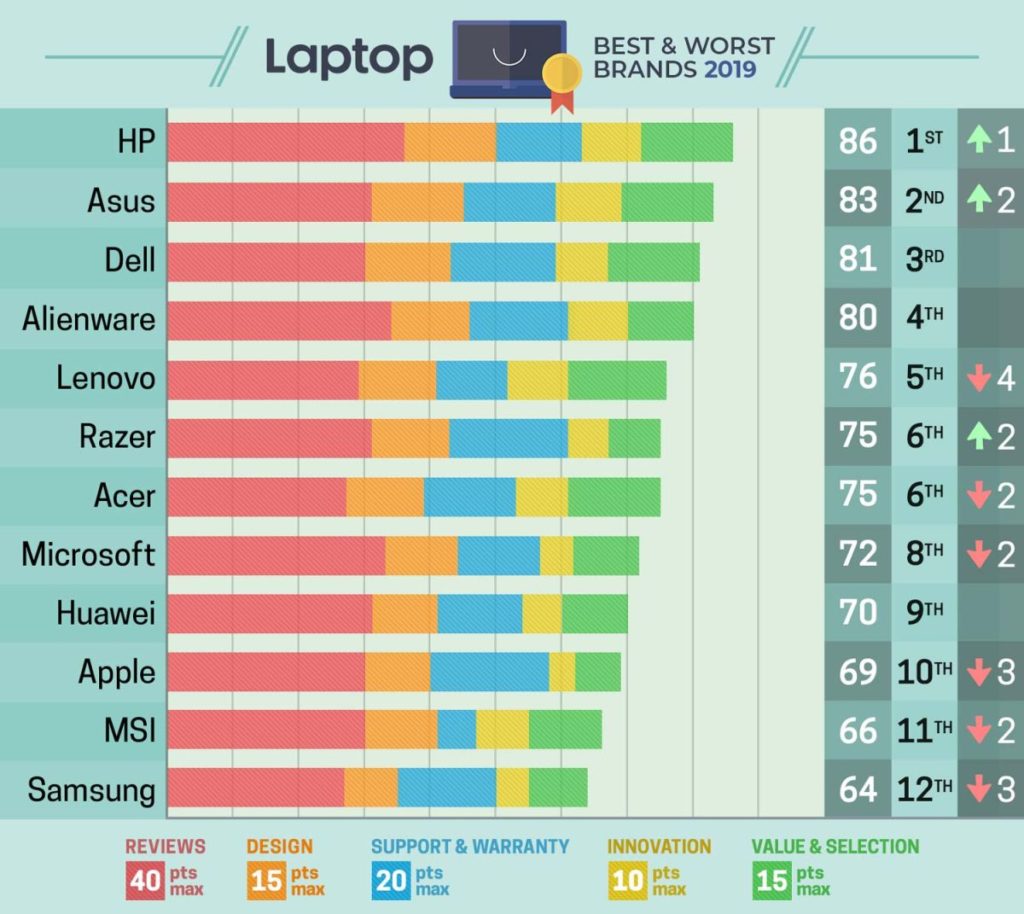
<h2>Chọn hãng nào thì phù hợp</h2>
Thực ra bây giờ chất lượng của các hãng đã gần tiệm cận nhau rồi, chỉ khác nhau giữa các phân khúc của cùng một hãng. Hãng nào cũng sẽ có các phân khúc sản phẩm tiêu biểu sau: hàng bình dân giá rẻ, hàng trung cấp, hàng cao cấp.

<p>Do đó việc chọn hãng nào không quá quan trọng, chỉ cần chọn hãng thông dụng một chút (để lỡ có hư hỏng gì thì còn có linh kiện thay) như Apple, Dell, HP,… là được, không nên mua các hãng lạ, hàng xách tay nhật, EU… vì sau này nếu hư hỏng gì là vứt, không có linh kiện thay thế (hoặc nếu có thì cũng không hề rẻ)</p>

<p>Việc quan trọng là chọn phân khúc sản phẩm cho phù hợp, và mình khuyên là nên chọn phân khúc trung cấp, vì các sản phẩm ở phân khúc này thường có sự cân bằng giữa các yếu tố: cấu hình, độ bền, thẩm mỹ.</p>
<figure><img alt="Chọn laptop theo thương hiệu" data-src="https://trinhanlaptop.vn/app/uploads/2020/03/hCa9n7YUCrCfwqC69tYtLW-1200-80-1024x914.jpg" data-srcset="https://trinhanlaptop.vn/app/uploads/2020/03/hCa9n7YUCrCfwqC69tYtLW-1200-80-1024x914.jpg 1024w, https://trinhanlaptop.vn/app/uploads/2020/03/hCa9n7YUCrCfwqC69tYtLW-1200-80-500x446.jpg 500w, https://trinhanlaptop.vn/app/uploads/2020/03/hCa9n7YUCrCfwqC69tYtLW-1200-80-600x536.jpg 600w, https://trinhanlaptop.vn/app/uploads/2020/03/hCa9n7YUCrCfwqC69tYtLW-1200-80.jpg 1200w" height="910" sizes="(max-width: 1020px) 100vw, 1020px" src="https://trinhanlaptop.vn/app/uploads/2020/03/hCa9n7YUCrCfwqC69tYtLW-1200-80-1024x914.jpg" srcset="https://trinhanlaptop.vn/app/uploads/2020/03/hCa9n7YUCrCfwqC69tYtLW-1200-80-1024x914.jpg 1024w, https://trinhanlaptop.vn/app/uploads/2020/03/hCa9n7YUCrCfwqC69tYtLW-1200-80-500x446.jpg 500w, https://trinhanlaptop.vn/app/uploads/2020/03/hCa9n7YUCrCfwqC69tYtLW-1200-80-600x536.jpg 600w, https://trinhanlaptop.vn/app/uploads/2020/03/hCa9n7YUCrCfwqC69tYtLW-1200-80.jpg 1200w" width="1020" />
<figcaption>Chọn laptop theo thương hiệu</figcaption>
</figure>
<h2>Cụ thể, chọn laptop thế nào thì phù hợp để học và làm việc online</h2>
Thứ nhất,&nbsp;<b>về màn hình</b>. Nên chọn kích thước 14″ trở lên, nếu muốn tốt cho mắt thì chọn 15.6″, nếu muốn tiện di chuyển thì chọn 14″. Đừng nên chọn laptop có màn hình nhỏ hơn 14″ vì khi học hoặc làm việc online thì bạn phải ngồi trước máy khá lâu, màn hình nhỏ quá sẽ làm mắt bạn phải điều tiết nhiều mới nhìn được rõ, dễ bị mỏi mắt và cận thị.

<p>Thứ hai,&nbsp;<b>về cpu</b>&nbsp;(bộ vi xử lý): nên chọn loại core i5 là ổn.</p>

<p>Thứ ba,&nbsp;<b>về ram</b>: tối thiểu 4G là ổn.</p>

<p>Thứ tư:&nbsp;<b>về ổ cứng</b>: có ssd là 1 điểm cộng, điều này sẽ giúp bạn sử dụng máy trơn tru, hay còn gọi là “mượt”</p>

<p>Thứ năm,&nbsp;<b>về camera / webcam</b>: tối thiểu phải có, còn độ phân giải của nó thì ko quá quan trọng.</p>

<p>Thứ 6,&nbsp;<b>về loa</b>: nên chọn loại laptop có loa to một chút, để đỡ phải đeo tai nghe hoặc gắn thêm loa ngoài khi nghe bài giảng online hoặc họp trực tuyến</p>
<p><em><strong>Vậy là xong</strong></em>, tuy có hơi dài dòng nhưng viết nhiều như vậy mới có thể truyền đạt được hết những gì cần nói. Chúc các bạn chọn được một chiếc laptop phục vụ việc học tập và làm việc trực tuyến trong thời Cô Vy này nhé, và đừng quên <a href="http://laptop127.vn"><strong>LAPTOP127</strong><b>&nbsp;có bán rất nhiều laptop cũ</b></a></p>
		</div>
	</div>
	<div id="footer" class="clearfix">
		<div id="url">
			<strong>URL của bản tin này: </strong><a href="http://www.laptop127.vn/news/tin-tuc/laptop127-cach-chon-mua-laptop-hoc-online-phu-hop-mua-dich-covid-19-133.html" title="LAPTOP127 Cách chọn mua laptop học online phù hợp mùa dịch Covid-19">http://www.laptop127.vn/news/tin-tuc/laptop127-cach-chon-mua-laptop-hoc-online-phu-hop-mua-dich-covid-19-133.html</a>

		</div>
		<div class="clear"></div>
		<div class="copyright">
			&copy; Laptop Cũ Thái Nguyên - Laptop127
		</div>
		<div id="contact">
			<a href="mailto:webmaster@laptop127.vn">webmaster@laptop127.vn</a>
		</div>
	</div>
</div>
        <div id="timeoutsess" class="chromeframe">
            Bạn đã không sử dụng Site, <a onclick="timeoutsesscancel();" href="http://www.laptop127.vn/#">Bấm vào đây để duy trì trạng thái đăng nhập</a>. Thời gian chờ: <span id="secField"> 60 </span> giây
        </div>
        <div id="openidResult" class="nv-alert" style="display:none"></div>
        <div id="openidBt" data-result="" data-redirect=""></div>
<script src="http://www.laptop127.vn/assets/js/jquery/jquery.min.js"></script>
<script>var nv_base_siteurl="/",nv_lang_data="vi",nv_lang_interface="vi",nv_name_variable="nv",nv_fc_variable="op",nv_lang_variable="language",nv_module_name="news",nv_func_name="savefile",nv_is_user=0, nv_my_ofs=7,nv_my_abbr="ICT",nv_cookie_prefix="nv4c_b9F0Z",nv_check_pass_mstime=1738000,nv_area_admin=0,nv_safemode=0,theme_responsive=0,nv_is_recaptcha=0;</script>
<script src="http://www.laptop127.vn/assets/js/language/vi.js"></script>
<script src="http://www.laptop127.vn/assets/js/global.js"></script>
<script src="http://www.laptop127.vn/themes/laptop127/js/news.js"></script>
<script src="http://www.laptop127.vn/themes/laptop127/js/main.js"></script>
<script>
        window.fbAsyncInit = function() {
          FB.init({
            xfbml            : true,
            version          : 'v6.0'
          });
        };

        (function(d, s, id) {
        var js, fjs = d.getElementsByTagName(s)[0];
        if (d.getElementById(id)) return;
        js = d.createElement(s); js.id = id;
        js.src = 'https://connect.facebook.net/vi_VN/sdk/xfbml.customerchat.js';
        fjs.parentNode.insertBefore(js, fjs);
      }(document, 'script', 'facebook-jssdk'));</script>
<script type="text/javascript">
	$(document).ready(function() {
		var aboveHeight = 0;
			$(window).scroll(function(){
				if ($(window).scrollTop() > aboveHeight){
				$('sticknav').addClass('fixed').css('top','0').next().css('padding-top','60px');
				} else {
			   $('sticknav').removeClass('fixed').next().css('padding-top','0');
				}
			});
	});
</script>
<script src="http://www.laptop127.vn/themes/laptop127/js/bootstrap.min.js"></script>
</body>
</html>